PasteDrawer — Clipboard history for WindowsEverything you copied,
in a drawer.
PasteDrawer is a GUI clipboard extension tool that keeps the text, images and files you copy. Pull your history out from the edge of the screen, then drag a card to wherever you want to paste it.
Oct 8 weekly meeting
- Decide the launch date
-
This demo runs in your browser. Use the buttons above to switch views. Right-click a card to save it to a group, and use “+” to make a new group. Turn off “On top” and the panel and window close by themselves after you paste. Move the sticky note or window by its title bar, and resize it from the bottom-right corner. You can also drag cards into apps outside this page.
The real app
See it on a real Windows desktop
The demo above runs in your browser. This is PasteDrawer itself: a panel at the bottom, left or right edge, a sticky note, or a regular window.
13 seconds, no sound. Recorded on Windows 11.
Features
Spend less time copying and pasting
Paste by drag and drop
Drag a card into the app you want. Double-click or press Enter to paste straight into the app you were just using.
Text, images and files
Records text, HTML, RTF, images and files. Each card shows which app it came from and when.
Formatted or plain
One switch decides whether pastes keep their formatting or become plain text. Shift + Enter flips it for a single paste.
Groups and snippets
Save frequent items in tabs, along with boilerplate text you write yourself. Items in a group are never cleaned up automatically.
Search and pin
Keeps up to 300 items by default. Filter by keyword, and pin the ones that matter.
Stay on top
When it is on, the window and sticky note stay above other apps, and the panel and window stay open after you paste.
Keyboard
No mouse required
Ctrl + Shift + V opens your history, and from there you can pick and paste with the keyboard alone. The hotkey can be changed in settings.
| ↑ ↓ ← → | Select an item |
|---|---|
| Enter | Paste |
| Shift + Enter | Paste with formatting flipped |
| Ctrl + 1–9 | Paste the nth item |
| Tab | Turn formatting on or off |
| Ctrl + C | Copy to the clipboard only |
| Ctrl + P | Pin / unpin |
| Delete | Delete the item |
| Esc | Clear search / close |
Settings
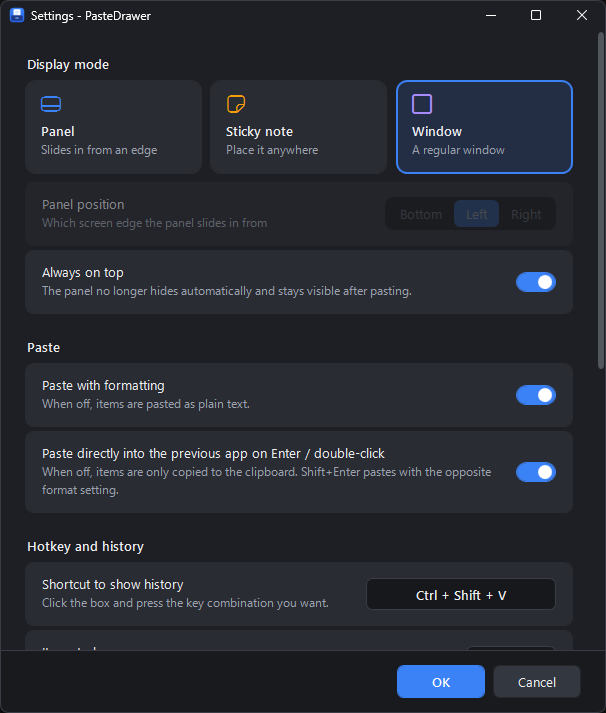
Settings at a glance
Change the display mode, hotkey, paste behavior, history size and more in one place. The dark design fits right in with Windows 11 and matches the history panel.
Privacy
Your history stays on this PC
Clipboards often hold passwords and personal details. PasteDrawer never sends your history anywhere.
- Stored locallySaved in %APPDATA%\PasteDrawer. No cloud sync and no uploads.
- Passwords are skippedAnything a password manager marks as “don’t keep in history” is never saved.
- The only traffic is license and update checksYour license key is verified every 7 days and new versions are checked for once a day. The app keeps working offline for 30 days.
Pricing
Every feature, free for 14 days
The trial has no limits. If you like it, buy a license.
PasteDrawer license
$12.99one-time · USD
- All features included
- Activate up to 2 PCs with one key
- New PC? Deactivate the old one and move your license over
Payments are handled by Lemon Squeezy. You can pay by credit card, PayPal and more. Any applicable tax is calculated at checkout.
- Download and try itRun the installer and you are ready to go. There is no .NET or anything else to install separately.
- Buy a licenseBuy from “License...” in the app’s menu, or from this page.
- Enter your keyEnter the license key from your purchase email in the app, and this PC is activated.

Made by
Yunolay
I’m a security engineer by trade, and I also stream as a VTuber. I built PasteDrawer to make working with the clipboard faster, through a GUI.
yunolay.com →FAQ
Frequently asked questions
What happens when the trial ends?
You can no longer open or paste from your history. Recording carries on in the background, so as soon as you enter a license key, your full history is there.
Does it work without an internet connection?
Yes. Activation needs an internet connection, but after that it keeps working offline for 30 days from the last check.
How do I move to a new PC?
On the old PC, open the “License...” window and click “Deactivate this PC”. That frees up a slot for the new one.
Is anything I copy ever sent online?
No. Your history is stored only on your PC. The only network traffic is the license key check and the check for new versions.
I lost my license key.
Sign in to the Lemon Squeezy orders page with the email address you bought with, and your key is listed there. If you cannot find it, please contact us.
Does it run on Mac or Linux?
Not at the moment. It supports Windows 10 / 11 (64-bit) only.
Can I get a receipt?
Yes. Lemon Squeezy emails you a receipt when you buy.
Can I get a refund?
We refund within 14 days of purchase if PasteDrawer does not work properly on a PC that meets the requirements and support cannot fix it, or if you bought twice by mistake. See the refund policy for details.